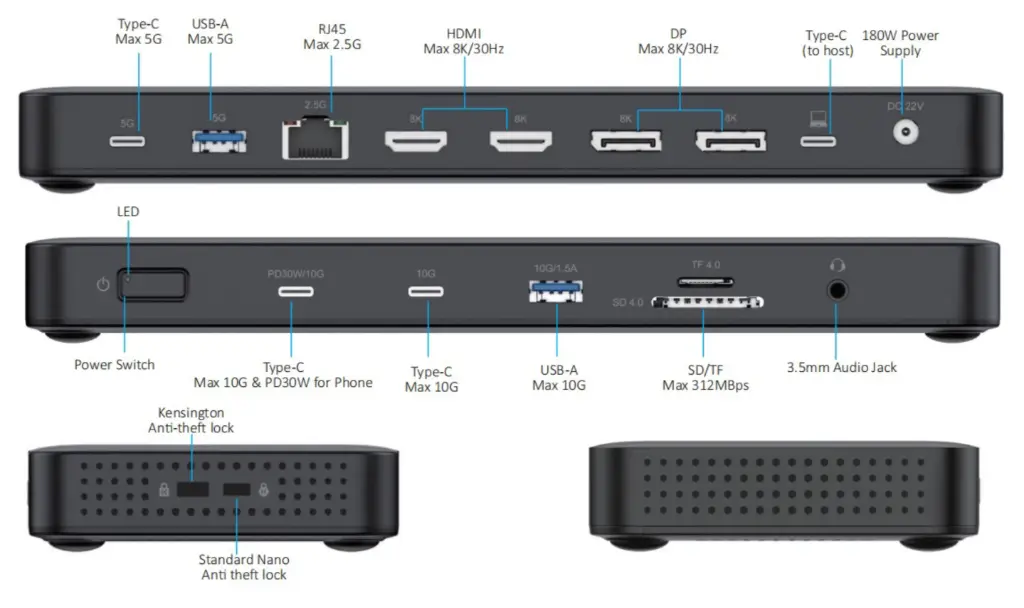
BCT3500-140W DisplayPort 2.1 8K Quad Display Docking Station / USB-C DP2.1, Quad Display, 140W PD, 2.5G Ethernet Docking Station
UPC: 810189122215
- DisplayPort 2.1 Alt Mode: Latest DP2.1 IC solution supporting UHBR20 data rates — up to quad 4K@60Hz displays on Windows (with DSC) or single 8K@30Hz output via HDMI or DisplayPort.
- 140W Power Delivery: External 180W power supply delivers up to 140W to your host laptop and up to 30W downstream charging for USB-C mobile devices.
- Extensive Connectivity: 14 ports including 2x HDMI (8K/30Hz), 2x DisplayPort (8K/30Hz), 2x USB-C 10Gbps, 1x USB-C 5Gbps, 1x USB-A 10Gbps, 1x USB-A 5Gbps, SD/TF 4.0 (312 MB/s), 2.5G Ethernet, and 3.5mm combo audio (192KHz).
- Wide Compatibility: Works with Thunderbolt 4, Thunderbolt 3, and full-featured USB-C laptops. Supports Windows 10/11, macOS, ChromeOS, Android, and Ubuntu Linux.
- Multiple Display Modes: Windows: single 8K, dual 8K+4K@120Hz, triple 4K@120Hz+4K@60Hz×2, or quad 4K@60Hz×4 with different content. macOS: up to quad 4K@60Hz mirrored.
Transform your workspace with the Bull Creek Technologies BCT3500-140W, a 14-in-1 USB-C docking station built on the latest DisplayPort 2.1 Alt Mode technology. Designed for power users who demand maximum display output and comprehensive connectivity from a single USB-C connection.
With support for up to four simultaneous 4K@60Hz displays (on compatible Windows systems with UHBR20 and DSC), or a single stunning 8K@30Hz output, this dock eliminates the need for multiple adapters and dongles. The integrated 180W power supply delivers up to 140W of pass-through charging to your laptop while reserving 30W for downstream USB-C device charging.
Five high-speed USB data ports (including two USB-C 10Gbps ports) handle external storage and peripherals with ease, while the 2.5 Gigabit Ethernet port provides ultra-fast, reliable wired networking. The SD/TF 4.0 card reader supports UHS-II speeds up to 312 MB/s, and the 3.5mm combo audio jack supports sample rates up to 192KHz for professional audio applications.
Compatible with Thunderbolt 4, Thunderbolt 3, and full-featured USB-C laptops running Windows 10/11, macOS, ChromeOS, Android, or Ubuntu Linux. Number of Monitors supported depends on host system.
1 year limited warranty
Bull Creek Technologies designs the BCT3500-140W so that it can be installed and used without vision, without hearing, without speech, and without fine motor control. The features below are built into the dock, and allow it to work with assistive technology. A full Accessibility Conformance Report (VPAT® 2.5Rev, Revised Section 508 edition) is available on request from support@bullcreektech.com.
Using the dock without vision
- Every connector is an industry-standard type that can be located and seated by touch, and the connector types are physically distinct from one another.
- USB-C connectors are reversible. There is no wrong orientation and nothing to line up visually.
- No port uses a thumbscrew, a latch, or a locking mechanism.
- The SD and microSD slots accept a card only in the correct orientation, and the notched corner of the card is discernible by touch before insertion.
- There are no setup screens, prompts, or timed steps. Once the dock is connected, the host computer detects everything attached to it.
The status indicator, and the same information without vision
The dock has a single power and status indicator, which lights when the dock has power and a working connection to the host. This indicator is visual only. The same information is always available from the host computer, where it can be read with a screen reader, magnifier, or other assistive technology:
- Power and connection: the displays, network adapter, and audio device the dock provides appear in the computer's system settings.
- Charging: the computer's own battery indicator reports that it is charging from the dock.
- Storage and cards: inserted memory cards and attached drives appear in the file manager.
The indicator on the dock conveys nothing that cannot also be obtained from the host computer.
Contrast, labels, and color
- Port markings and labels are light-colored markings on a dark housing and contrast with the surface behind them.
- Color is never the only way information is given. Every port is identified by a printed icon or text label and by the physical shape of its connector, in addition to any color used.
- The status indicator conveys its state by whether it is lit, not by its hue.
Operating the dock with limited strength, reach, or dexterity
- Every operation — connecting the host cable, attaching peripherals, inserting memory cards, and using the control — is performed with one hand and requires no tight grasping, pinching, or twisting of the wrist.
- The force needed to operate the control is well below 5 pounds (22.2 N).
- The dock weighs 361 g (0.80 lbs) and is not fixed in place. It can be positioned wherever it is comfortably within reach, and the supplied 1 m host cable allows the computer to sit some distance away.
- Nothing on the dock requires a timed response.
Connecting assistive technology through the dock
Every data connection uses an industry-standard, non-proprietary format — USB Type-C, USB Type-A, HDMI, DisplayPort, RJ45 Ethernet, SD and microSD, and a 3.5mm CTIA/OMTP combo audio jack — so assistive technology can be connected to the host computer through the dock, including:
- Alternative keyboards, alternative pointing devices, trackballs, head pointers, and switch interfaces, using the USB-A and USB-C ports.
- Refreshable braille displays and braille notetakers, using the USB ports.
- Headsets, assistive listening devices, and hearing-aid streamers, using the 3.5mm combo jack. The jack detects CTIA and OMTP wiring automatically, and the supplied Y-splitter separates the headphone and microphone connections for equipment that needs them apart.
The dock installs no software and no drivers of its own, so assistive technology already set up on the host computer continues to work exactly as it does when the same equipment is plugged directly into the computer.
Displays, captions, and audio description
- The dock passes video and audio through without altering them. Closed captions, audio description tracks, and accessibility information carried in the signal reach the monitor and headphones unchanged.
- Operating system accessibility settings — screen magnification, high contrast and color filters, larger text and pointers, and caption styling — are applied by the computer and work normally on monitors connected through the dock.
- Caption and volume controls remain on the host computer and in the application in use. The dock does not intercept them.
No software to install
The BCT3500-140W requires no application, configuration utility, or account, and works as soon as it is connected. Where a device driver is needed, for example for the Ethernet adapter, it is supplied and maintained by the operating system or the silicon vendor and has no user interface of its own.
Getting help
- Email support@bullcreektech.com. Email is available to every customer and does not require the use of voice telephony.
- Telephone support accepts calls placed through the Telecommunications Relay Service. Dial 711 to reach TRS in the United States.
- If you need this documentation in a different format, ask us and we will provide one.
|
DP2.1 Host 2 lane 20G , with DSC 3:1 |
|
|
Number of Displays |
Max resolution |
|
1 |
8K/60Hz(YCC420) |
|
2 |
8K/30Hz x1 + 4K/120Hz x1 |
|
3 |
4K/120Hz x1 + 4K/60Hz x2 |
|
4 |
4K/60Hz x4 |
|
DP2.1 Host 2 lane 13.5G, with DSC 3:1 |
|
|
Number of Displays |
Max resolution |
|
1 |
8K/30Hz |
|
2 |
8K/30Hz x1 + 4K/60Hz x1 |
|
3 |
4K/60Hz x3 |
|
4 |
4K/60Hz x3 +4K/30Hz x1 |
|
DP2.1 Host 2 lane 10G, with DSC 3:1 |
|
|
Number of Displays |
Max resolution |
|
1 |
8K/30Hz |
|
2 |
8K/30Hz x1 + 4K/60Hz x1 |
|
3 |
4K/60Hz x3 |
|
4 |
4K/60Hz x2 +4K/30Hz x2 |
|
DP1.4 Host 2 lane HBR3, with DSC 3:1 |
|
|
Number of Displays |
Max resolution |
|
1 |
8K/30Hz |
|
2 |
4K/60Hz x2 |
|
3 |
4K/60Hz x1 + 4K/30Hz x2 |
|
4 |
4K/30Hz x4 |
|
DP1.4 Host 2 lane HBR3 no DSC |
|
|
Number of Displays |
Max resolution |
|
1 |
4K/60Hz |
|
2 |
4K/30Hz x2 |
|
3 |
4K/30Hz x1 + 1080P/60Hz x2 |
|
4 |
1080P/60Hz x4 |
|
DP1.4 Host 2 lane HBR2 no DSC |
|
|
Number of Displays |
Max resolution |
|
1 |
4K/30Hz |
|
2 |
1080P/60Hz x2 |
|
3 |
1080P/60Hz x1 + 720P/60Hz x2 |
|
4 |
720P/60Hz x4 |
MAC Resolutions
Mirror mode for up to 4 monitors. In Extended mode, only one independent external screen is supported with SST (MAC). Theoretically, the maximum resolution is 8K at 30Hz. The actual resolution depends on the System and the monitor.